SMARTHISTORY

SMARTHISTORY

Service Design & Information Architecture

Building an adaptable, learner-friendly site for the world’s most-visited art history resource
ROLE

Project Lead

UX Strategy

User Research

Information Architecture

Database Design

Prototyping

Usability Testing

CLIENT

Smarthistory

TOOLS

Figma

Wordpress

Airtable

Optimal Workshop
Context

Smarthistory is used by millions of educators, students, and informal learners every year, offering free educational resources spanning art from every continent, from prehistory to the present.

Over the past decade, Smarthistory’s library of content has grown to more than 4,000 videos and essays. Contributing scholars have increasingly emphasized global interconnections—reflecting the discipline's move away from the Western canon and toward art's relationships across place, time, material, and cultural exchange.

But the legacy website couldn’t support this growth and evolution.

Context

Smarthistory is used by millions of educators, students, and informal learners every year, offering free educational resources spanning art from every continent, from prehistory to the present.

Over the past decade, Smarthistory’s library of content has grown to more than 4,000 videos and essays. Contributing scholars have increasingly emphasized global interconnections—reflecting the discipline's move away from the Western canon and toward art's relationships across place, time, material, and cultural exchange.

But the legacy website couldn’t support this growth and evolution.

The Legacy Site

Built on a rigid hierarchical structure with traditional categories, the old site required:

  • Duplicate pages whenever an artwork belonged to more than one category

  • Manual updates across those duplicates

  • Bloated server storage

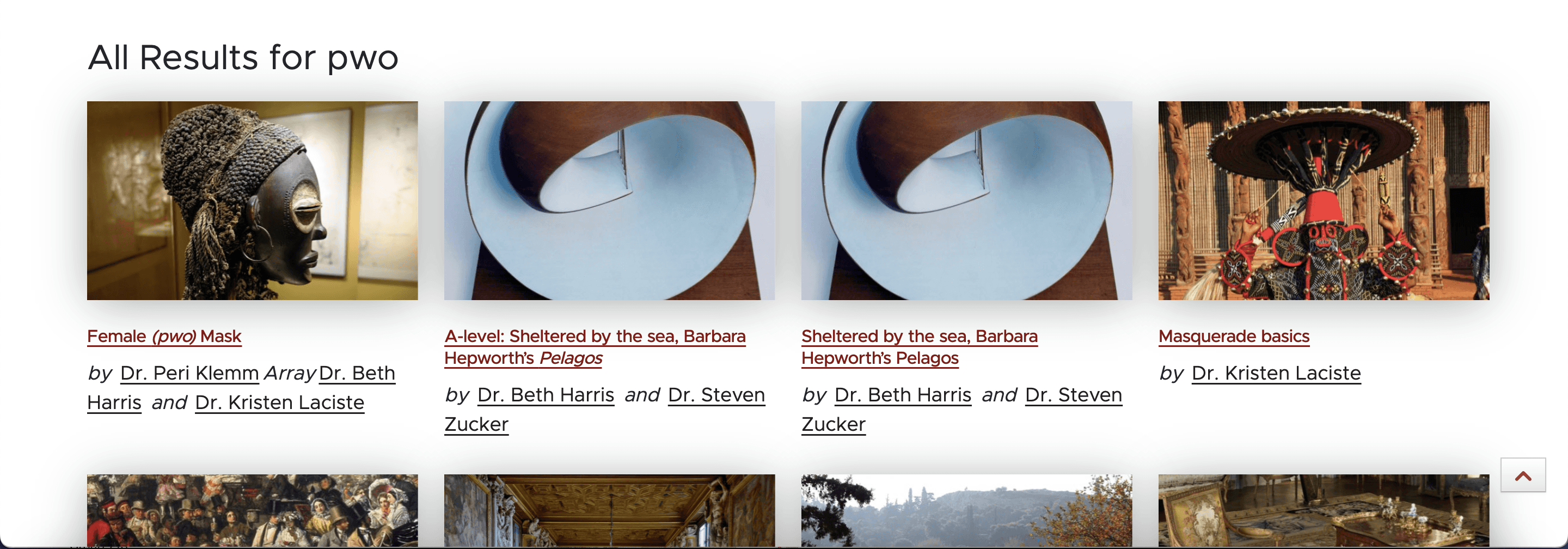
  • Confusing search results with identical pages appearing multiple times, and no way to filter


    At the same time, UI inconsistencies, outdated templates, and no search filtering made the site increasingly difficult to use—especially as major new content (like Smarthistory’s new textbook Reframing Art History) couldn’t be surfaced through existing navigation.

The Legacy Site

Built on a rigid hierarchical structure with traditional categories, the old site required:

  • Duplicate pages whenever an artwork belonged to more than one category

  • Manual updates across those duplicates

  • Bloated server storage

  • Confusing search results with identical pages appearing multiple times, and no way to filter


    At the same time, UI inconsistencies, outdated templates, and no search filtering made the site increasingly difficult to use—especially as major new content (like Smarthistory’s new textbook Reframing Art History) couldn’t be surfaced through existing navigation.

Legacy site search results with duplicate content pages

Legacy site search results with duplicate content pages

The Challenge

Smarthistory needed a new website that could:

1. Model the interconnected, global art history advocated by scholars,
2. Support educators and students who still rely on traditional categories,
3. Eliminate technical and editorial burdens created by the legacy system.

The Challenge

Smarthistory needed a new website that could:

1. Model the interconnected, global art history advocated by scholars,
2. Support educators and students who still rely on traditional categories,
3. Eliminate technical and editorial burdens created by the legacy system.

Process

Process

Discovery → Define → Ideate → Prototype & Test → Design → Implement

  1. Discovery

  2. Define

  3. Ideate

  4. Prototype & Test

  5. Design

  6. Implement

Discovery

Discovery

I conducted research to deeply understand the needs of all stakeholders and validate the Smarthistory team's understanding of the problem at hand.
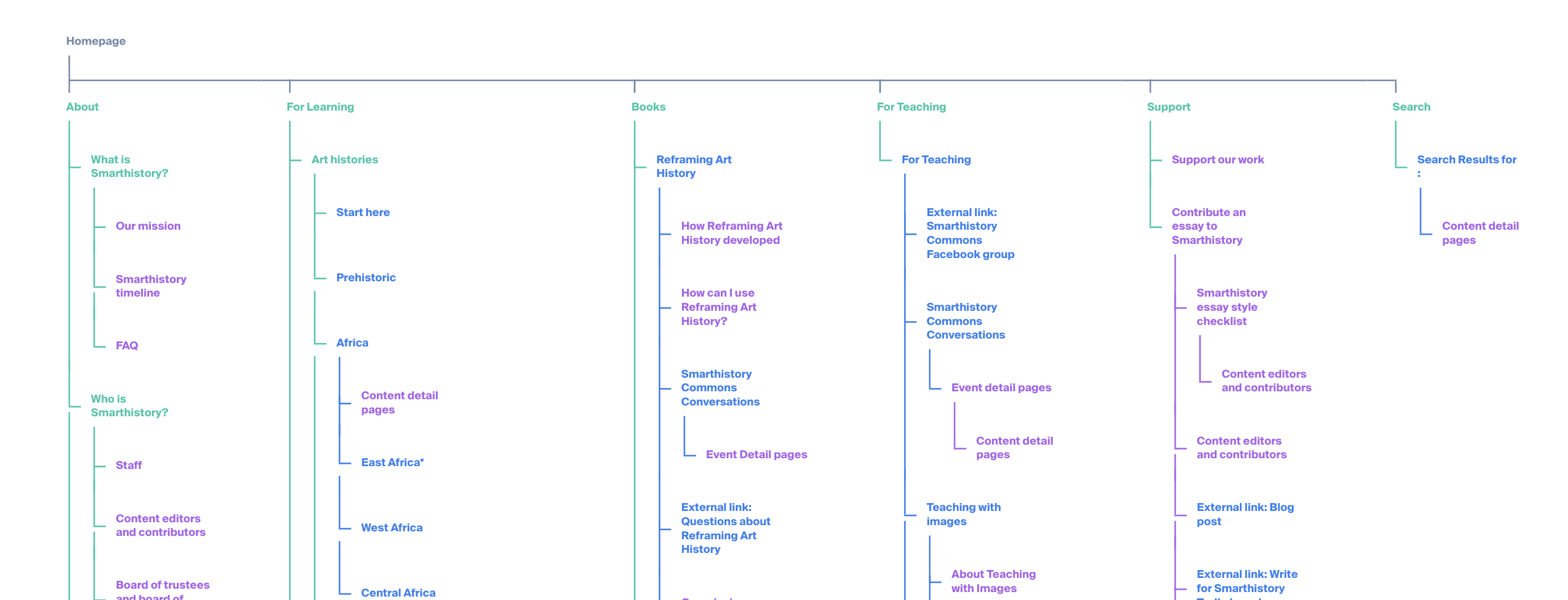
Sitemap of legacy site

Methods

  • Content inventory of all 3,500+ pages


  • Legacy sitemap + tree testing with novices and educators


  • Interviews with scholars, instructors, and learners


  • Comparative analysis of 5 major art history textbooks, art museum websites, and other competitors


  • Historical analysis of Smarthistory’s IA from 2004–present


  • Usability studies synthesis (Google Analytics, heatmaps, eyetracking)


Methods

  • Content inventory of all 3,500+ pages


  • Legacy sitemap + tree testing with novices and educators


  • Interviews with scholars, instructors, and learners


  • Comparative analysis of 5 major art history textbooks


  • Historical analysis of Smarthistory’s IA from 2004–present


  • Usability studies synthesis (Google Analytics, heatmaps, eyetracking)

Methods

  • Content inventory of all 3,500+ pages


  • Legacy sitemap + tree testing with novices and educators


  • Interviews with scholars, instructors, and learners


  • Comparative analysis of 5 major art history textbooks


  • Historical analysis of Smarthistory’s IA from 2004–present


  • Usability studies synthesis (Google Analytics, heatmaps, eyetracking)

Purpose

  • Understand the breadth of content to inform decisions for new information architecture


  • Understand how legacy information architecture facilitates or disrupts users' ability to successfully complete tasks


  • Understand users' needs


  • Understand other major sources of art history education to contextualize users' mental models


  • Understand how Smarthistory got to where it is today to be able to communicate with staff effectively


  • Identify immediate and longer-term opportunities for improving UI and UX site-wide
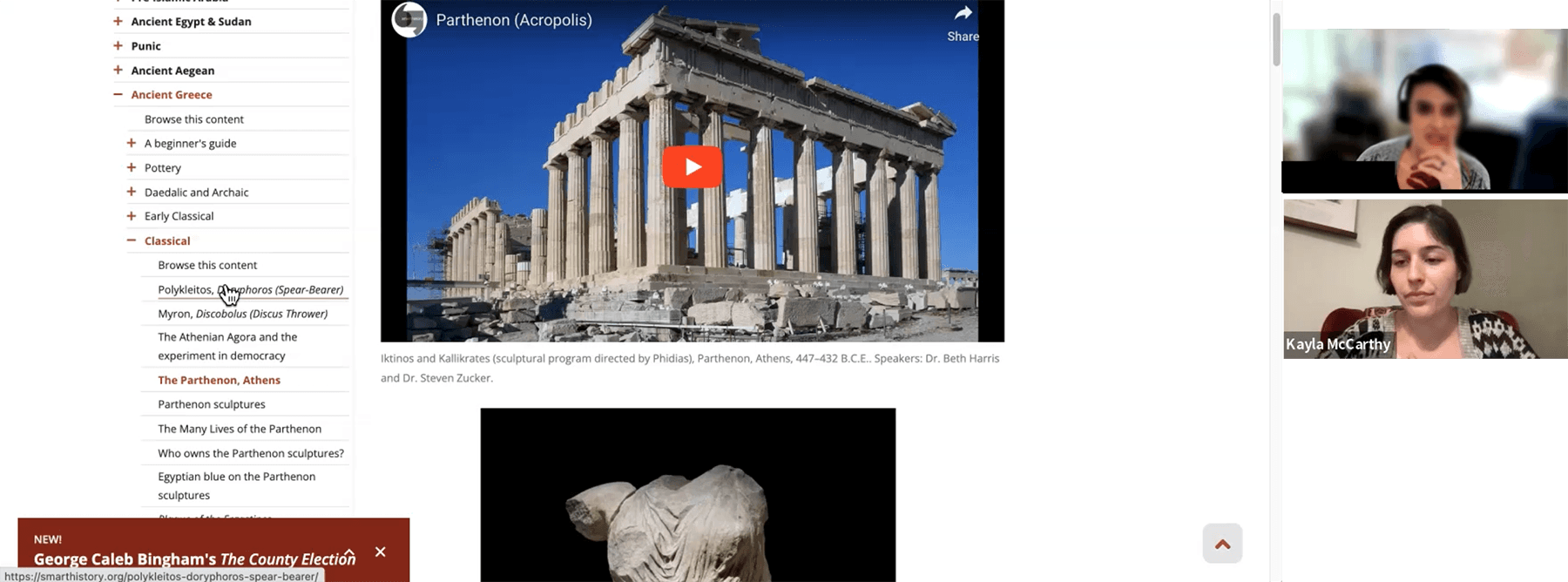
User interview session about legacy site

Key Insights

Key Insights

Users & Needs

Users & Needs

Based on interviews with scholars, AP and college instructors, students, and informal learners, user needs became clear.

  1. Discovery

  2. Define

  3. Ideate

  4. Prototype & Test

  5. Design

  6. Implement

Contributing Scholars

Write content for Smarthistory based on scholarship. Advocate for changes in how art history is understood and taught.

Needs

  • Organizational structure that represents global art history

  • Ability to see relationships across place, time, cultures, etc.

  • Models for learning and teaching that move beyond Eurocentric frameworks

  1. Discovery

  2. Define

  3. Ideate

  4. Prototype & Test

  5. Design

  6. Implement

Undergraduate and High School Instructors
Include Smarthistory resources in their course syllabi and look for ways of organizing their courses especially for areas outside of expertise.


Needs

  • Models for how to organize courses

  • Clarity on which content pages are videos vs. essays

  • Ability to see all content related to a topic in one place so that they can choose resources for their syllabi

  1. Discovery

  2. Define

  3. Ideate

  4. Prototype & Test

  5. Design

  6. Implement

Learners

Engage with Smarthistory videos or essays assigned by professors or browse informally to learn about areas of interest.

Needs

  • A way to explore and find what they're looking for based on familiar terminology and mental models

  • Clear, accurate search

  1. Discovery

  2. Define

  3. Ideate

  4. Prototype & Test

  5. Design

  6. Implement

Site Administrators
Add, edit, and maintain the website via Wordpress CMS so that it stays up to date.


Needs

  • Ability to categorize and organize content pages in more than one way without duplicating pages

  • An intuitive admin interface that ensured easy and consistent content and metadata entry

  1. Discovery

  2. Define

  3. Ideate

  4. Prototype & Test

  5. Design

  6. Implement

Diagnosis

The legacy site's hierarchical, one-to-one information architecture was best suited for an earlier Smarthistory iteration. This earlier version was essentially a web-based Western art history textbook, which was organized in a linear, chronological way based on traditional categories.


However, Smarthistory had grown into something less like a book and more like a library—a place to find videos and essays about artworks, as well as a slew of learning pathways that gathered together videos and essays to tell a larger story (such as art conservation or at-risk cultural heritage).


In the meantime, Smarthistory had tried adapting by repurposing templates and duplicating content when it fit into more than one category, which contributed to inconsistent UI/UX and complicated content management.

  1. Discovery

  2. Define

  3. Ideate

  4. Prototype & Test

  5. Design

  6. Implement

Strategy

To redesign the Smarthistory website as an adaptable library of content with a cleaned-up UI/UX, the strategy was 3-fold:


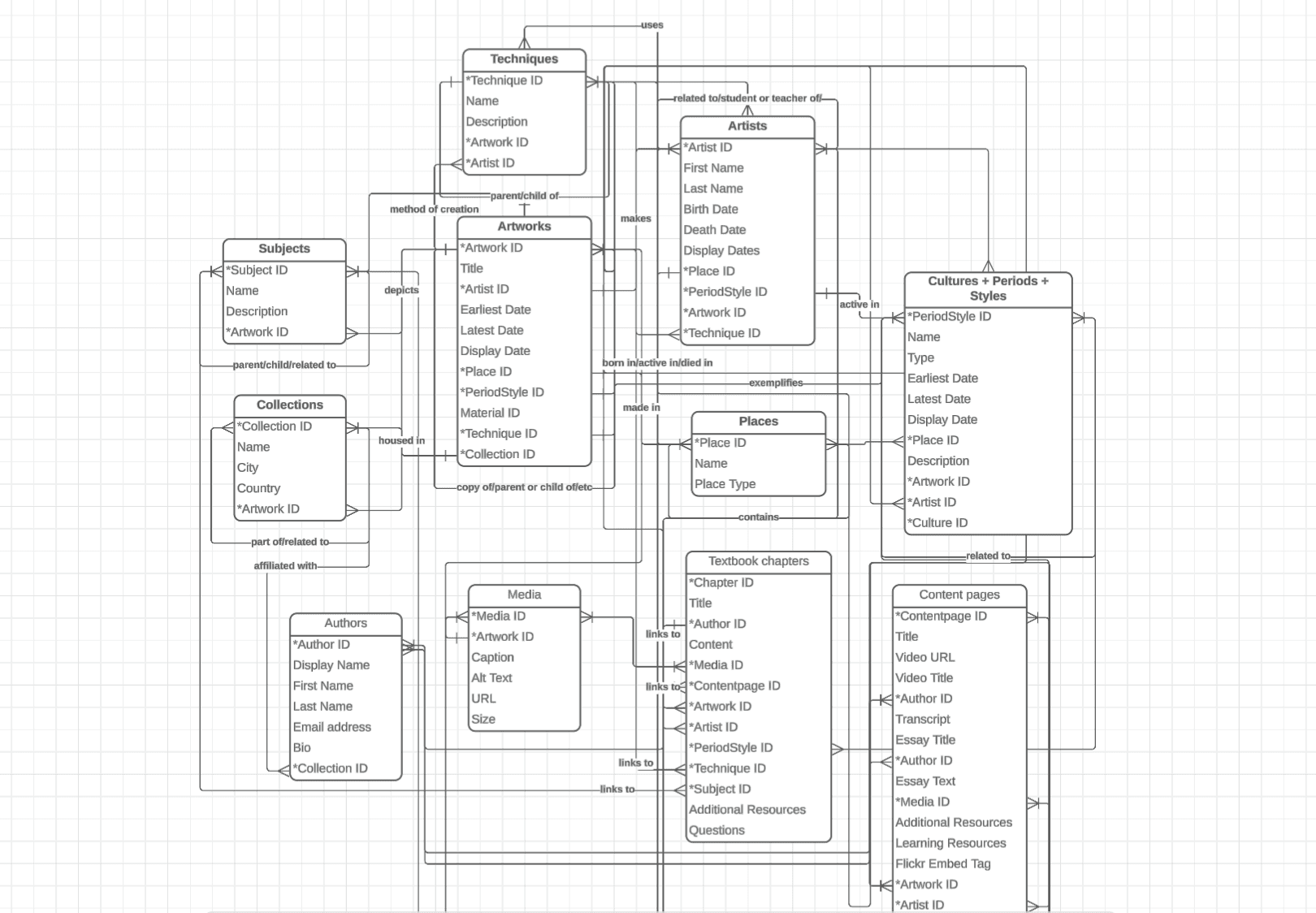
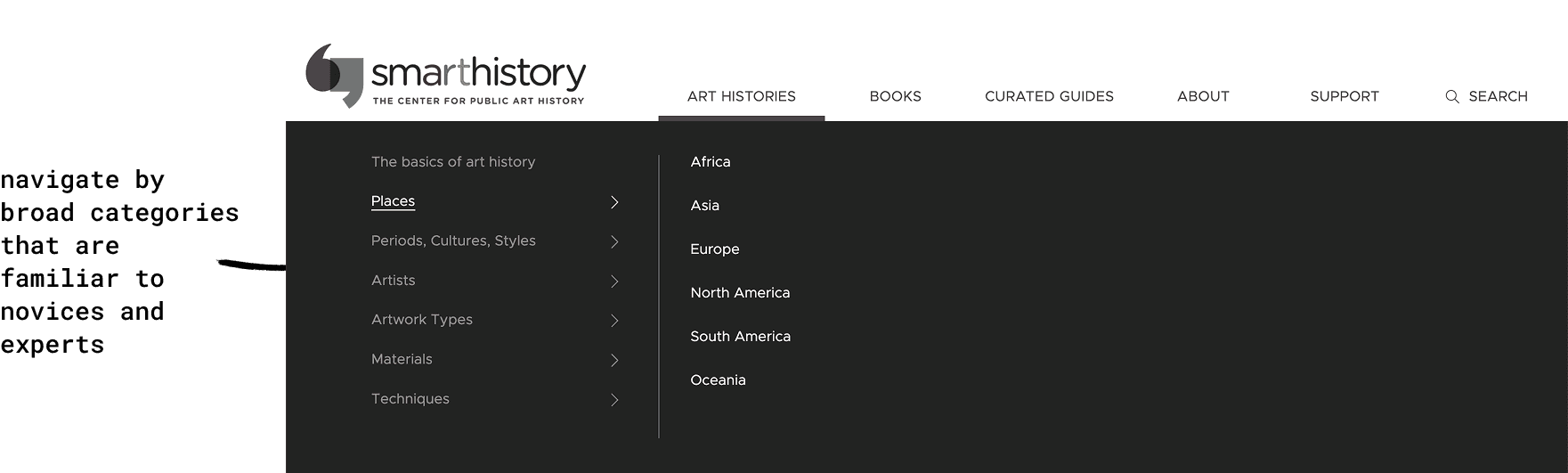
  1. Create a metadata structure that allows for many-to-many interconnections, as well as search filtering and sorting


Smarthistory needed an information architecture similar to that of an online library catalogue. Just as in a library catalogue you can find resources by type (book, e-book, publication) or genre or subject, Smarthistory's new information architecture would be based on a network of metadata using key taxonomies that emerged from discovery research.

This would enable categorization of content in multiple ways without duplication, support discoverability using common mental models of art history, and surface interconnections across categories.


  1. Discovery

  2. Define

  3. Ideate

  4. Prototype & Test

  5. Design

  6. Implement

Entity relationship diagram for a relational metadata structure. Consulted metadata and taxonomy experts at The Met and Google Arts & Culture to confirm validity.
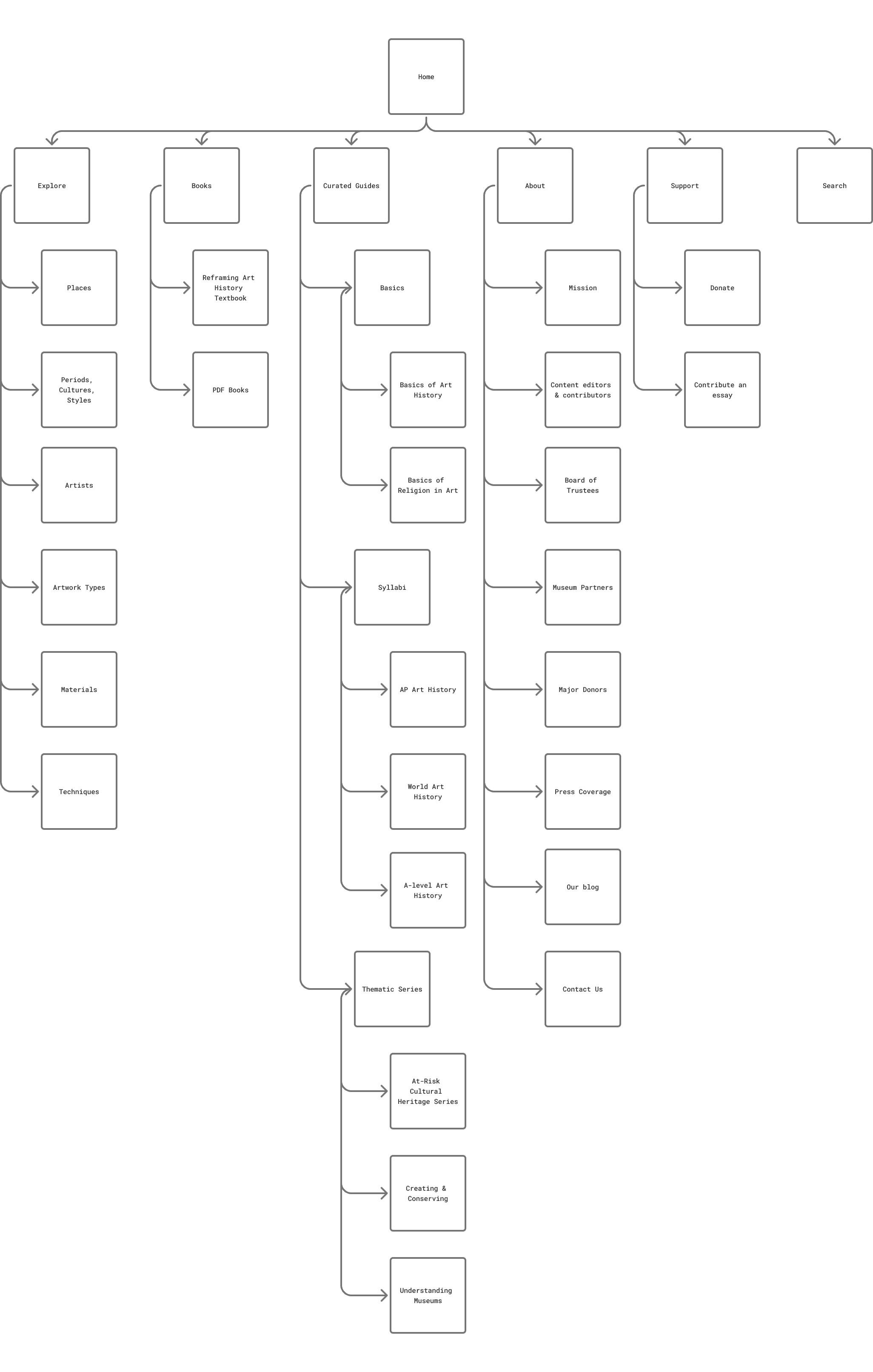
Sitemap for new information architecture

  1. Make clear learning pathways targeting specific user needs


In response to the growing library of content and grant projects, staff had created groupings of content about specific topics. But these content collections didn't always have a clear purpose. An audit of existing collections helped the content team decide on which collections to keep, revise, or archive based on who it was for and what need(s) it met.


At the same time, it was clear through user research that one important need was not being met by any of these content collections: instructors needed models for how they could organize their course syllabi. Smarthistory would solicit their contributing scholars to create sample syllabi made up of Smarthistory content. These syllabi could reflect more traditional ways of teaching a course, as well as newer ways, making them adaptable to evolving pedagogy.


  1. Discovery

  2. Define

  3. Ideate

  4. Prototype & Test

  5. Design

  6. Implement

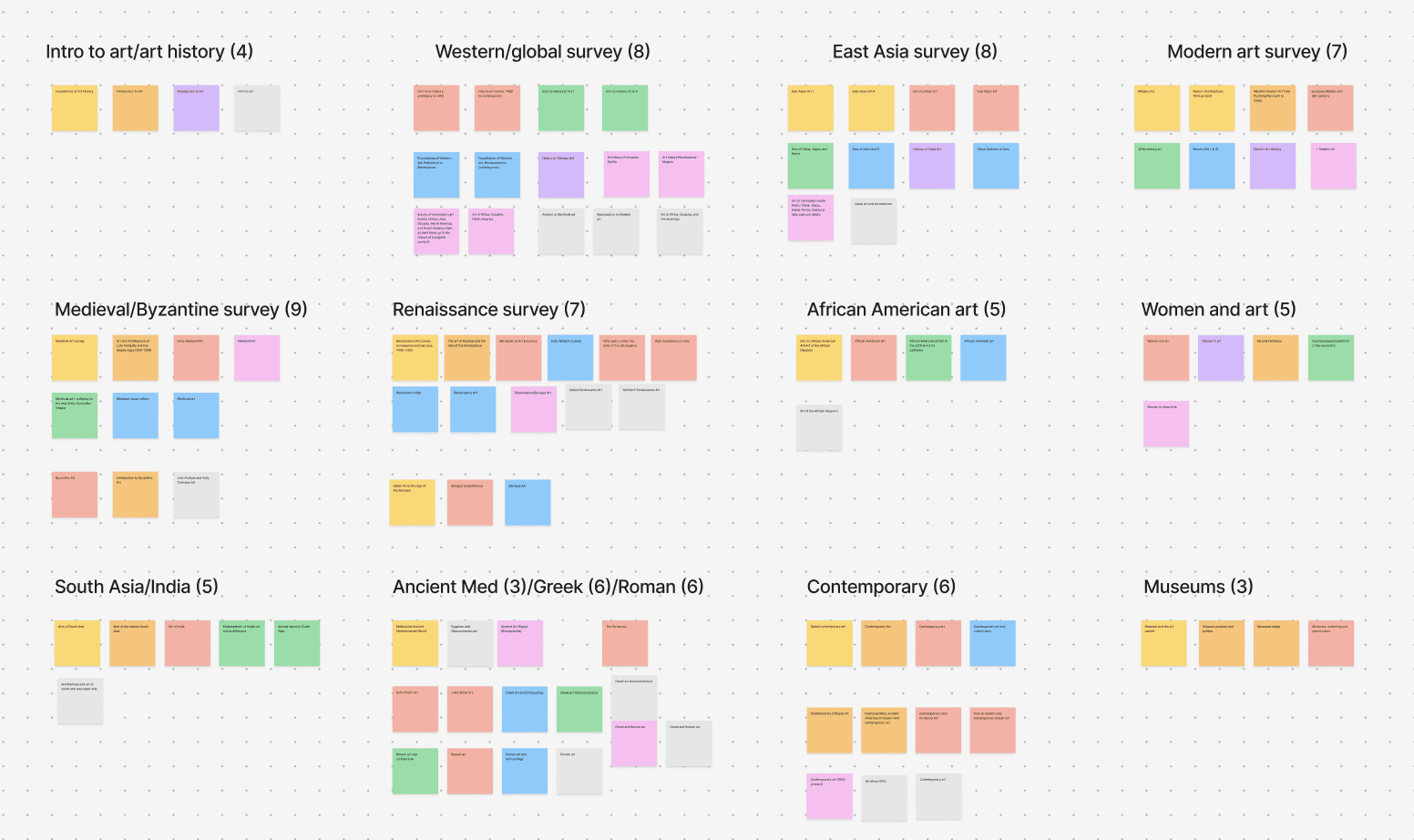
Affinity diagram of art history courses from 9 major university art history departments, used to prioritize syllabi to develop


  1. Improve UX/UI & CMS administration


New template designs and global styles would create a consistent, clean look and feel. Priority features emerged from usability testing and site administrator pain points.

  1. Discovery

  2. Define

  3. Ideate

  4. Prototype & Test

  5. Design

  6. Implement

Prototyping & Design

Round 1: Wireframes and low-fidelity prototype testing

  • Created low-fidelity designs for 5 page templates, in collaboration with designers at C&G Partners

  • Planned and facilitated initial testing of low-fi prototype with users, selecting participants from each main user group and preparing respective common user tasks and prompts that would reveal the prototype's usability

  • Advised and assisted with design revisions based on user feedback


  1. Discovery

  2. Define

  3. Ideate

  4. Prototype & Test

  5. Design

  6. Implement

Testing a content page wireframe and navigation with a user participant
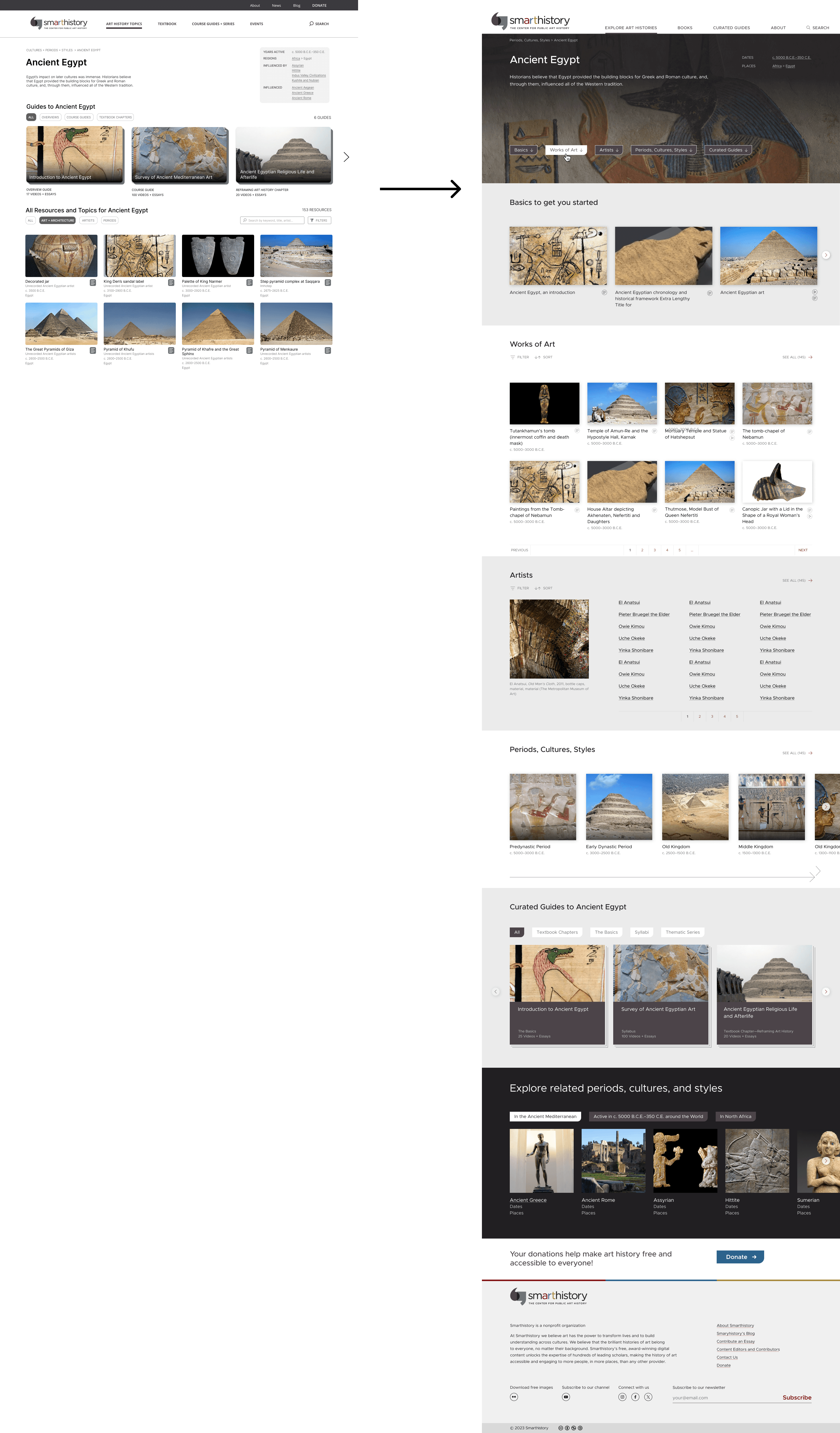
Key Insight

  1. Discovery

  2. Define

  3. Ideate

  4. Prototype & Test

  5. Design

  6. Implement

Landing pages were too complicated, offering too many buttons, tabs, and options all at once.


  1. Discovery

  2. Define

  3. Ideate

  4. Prototype & Test

  5. Design

  6. Implement

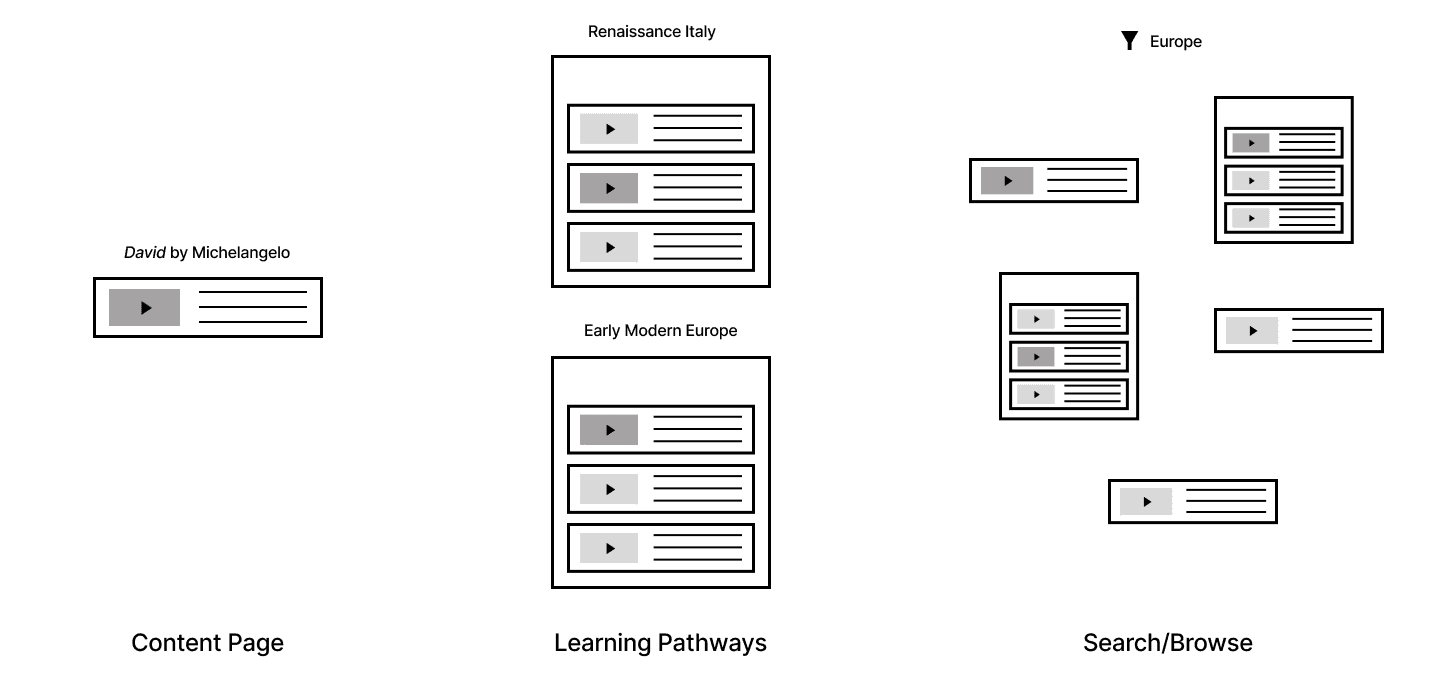
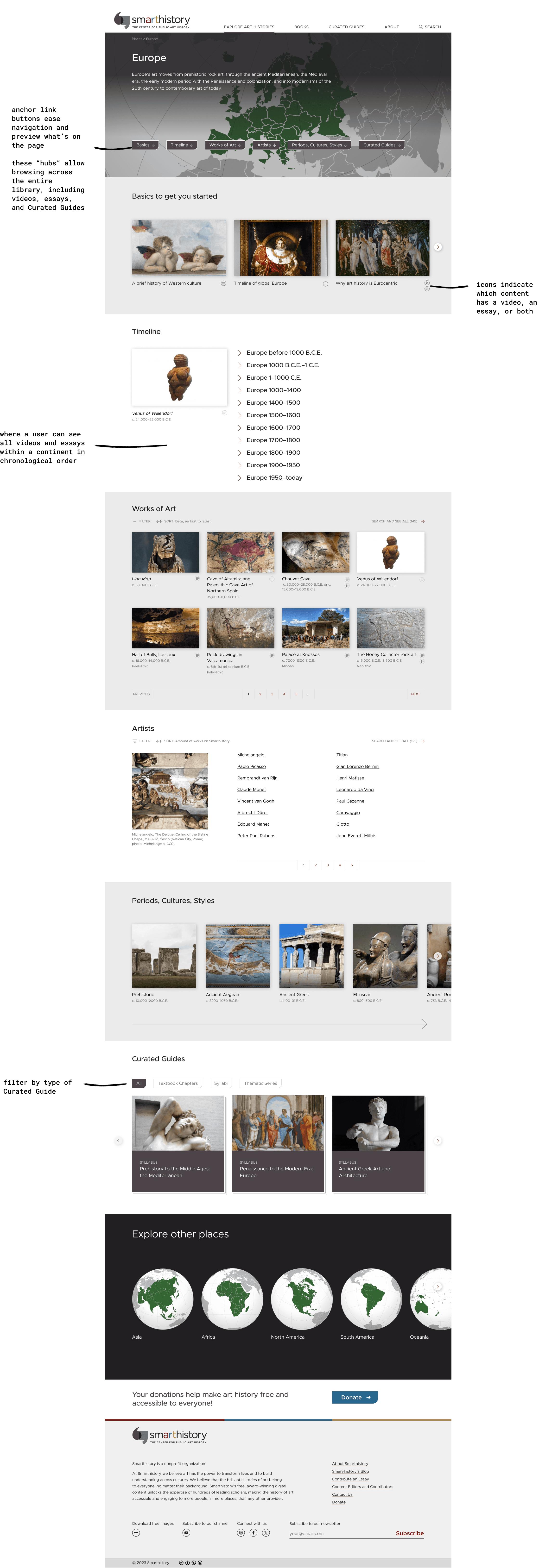
Landing pages became simpler, with anchor buttons above the fold giving a snapshot of the sections on the page. Each block was dedicated to one type of related content, instead of 4 or 5 types that needed to be filtered down.

  1. Discovery

  2. Define

  3. Ideate

  4. Prototype & Test

  5. Design

  6. Implement

Round 2+: High-fidelity designs and usability testing

  • Worked with UI designers to create a high-fidelity prototype

  • Devised a usability testing plan, recruiting representative instructors, students, informal learners, and scholars to complete common tasks using the prototype to test its usability

  • Facilitated usability testing and incorporated insights into a final round of revisions

  1. Discovery

  2. Define

  3. Ideate

  4. Prototype & Test

  5. Design

  6. Implement

Key Insight

  1. Discovery

  2. Define

  3. Ideate

  4. Prototype & Test

  5. Design

  6. Implement

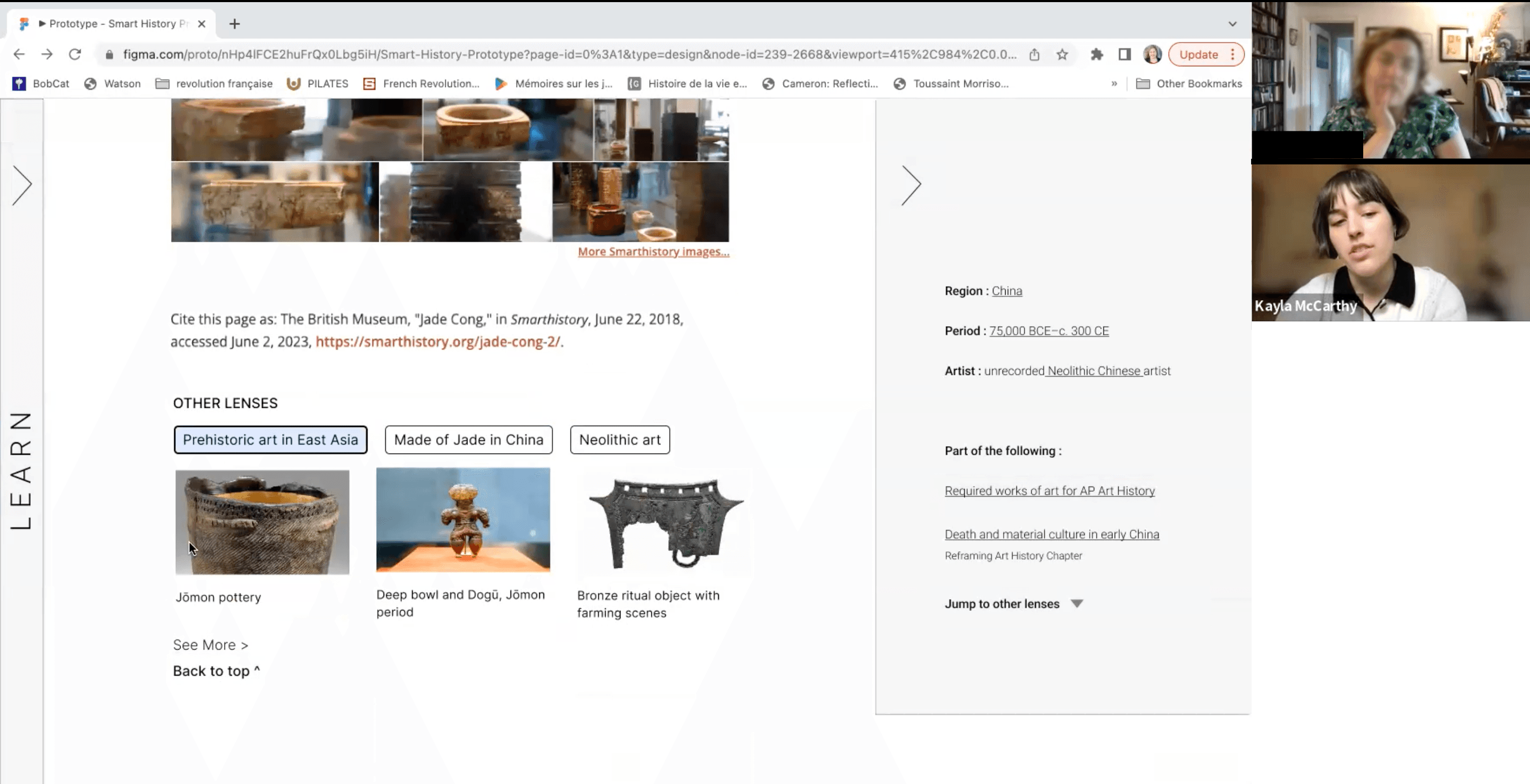
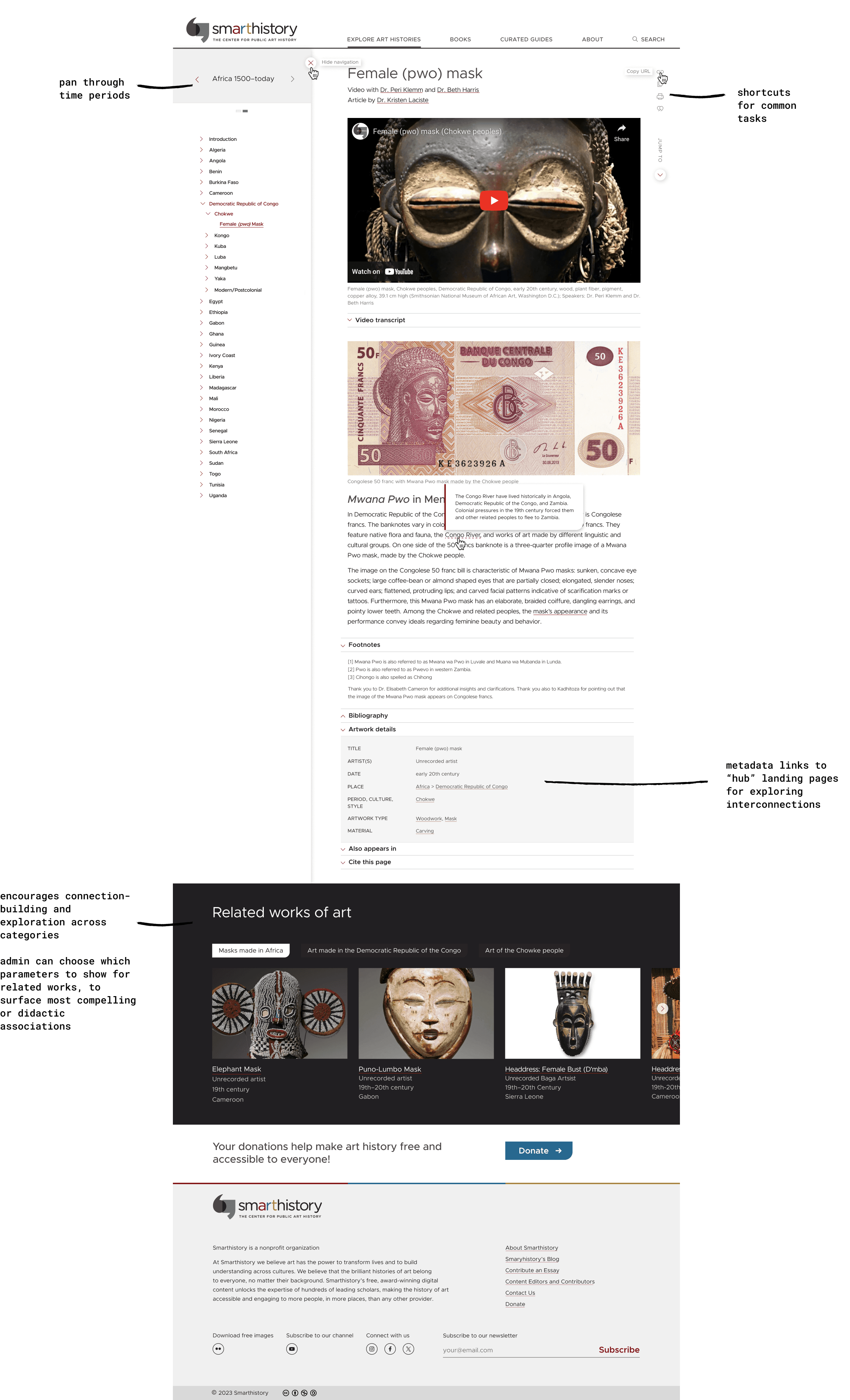
The carousel in the sidebar navigation was initially intended for users to be able to see how a content page was organized in different ways across the site (i.e. if a content page belonged to both the Art of Asia catalogue and the Islamic World Syllabus, the carousel on the page could pan between the two). Users did not find this functionality intuitive or useful; their expectation was to stay within the same context and move through time.

  1. Discovery

  2. Define

  3. Ideate

  4. Prototype & Test

  5. Design

  6. Implement

The carousel will now pan chronologically through time periods instead of across organizational sections.


  1. Discovery

  2. Define

  3. Ideate

  4. Prototype & Test

  5. Design

  6. Implement

Implementation

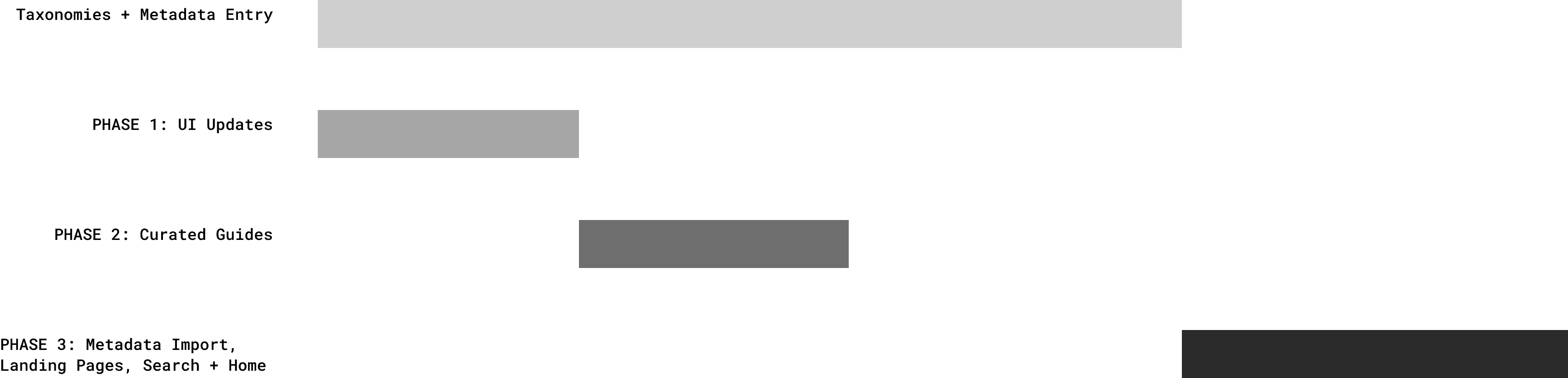
Implementation of the new metadata system was the most time-intensive phase of this process. Because of this, development and feature releases were broken into 3 major stages. The first two focused on features that weren't dependent on metadata. And the last major release saw the launch of all pages and features powered by the new metadata system.


Each phase was strategically aligned with off-peak times (between semesters and school years). I conducted QA and oversaw the communication and implementation of each release in conjunction with a small team of developers and support staff.


  1. Discovery

  2. Define

  3. Ideate

  4. Prototype & Test

  5. Design

  6. Implement


Taxonomies and Metadata


Database Setup and Data Entry

  • Built out relational database in Airtable based on entity relationship diagram

  • Set up workflow for confirming and refining taxonomic terms with staff art historians

  • Set up workflow for metadata entry for entire content library using refined taxonomic terms

  • Oversaw a team of 5 doing metadata entry for more than 3,500 pages

  • Removed duplicate pages and set up URL redirections to minimize broken links for users who used URLs in syllabi


  1. Discovery

  2. Define

  3. Ideate

  4. Prototype & Test

  5. Design

  6. Implement

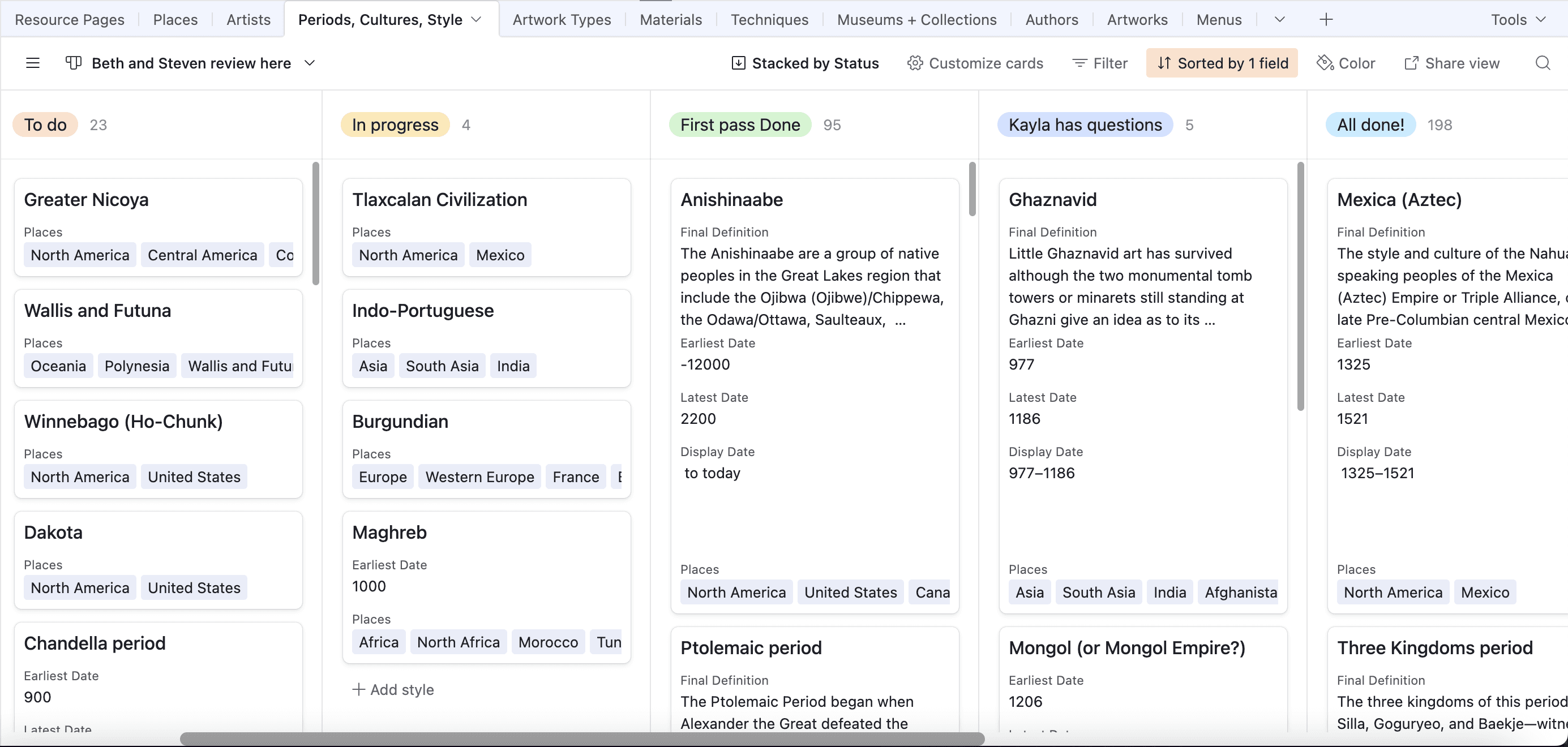
Kanban workflow for art historians to review and confirm taxonomic terms
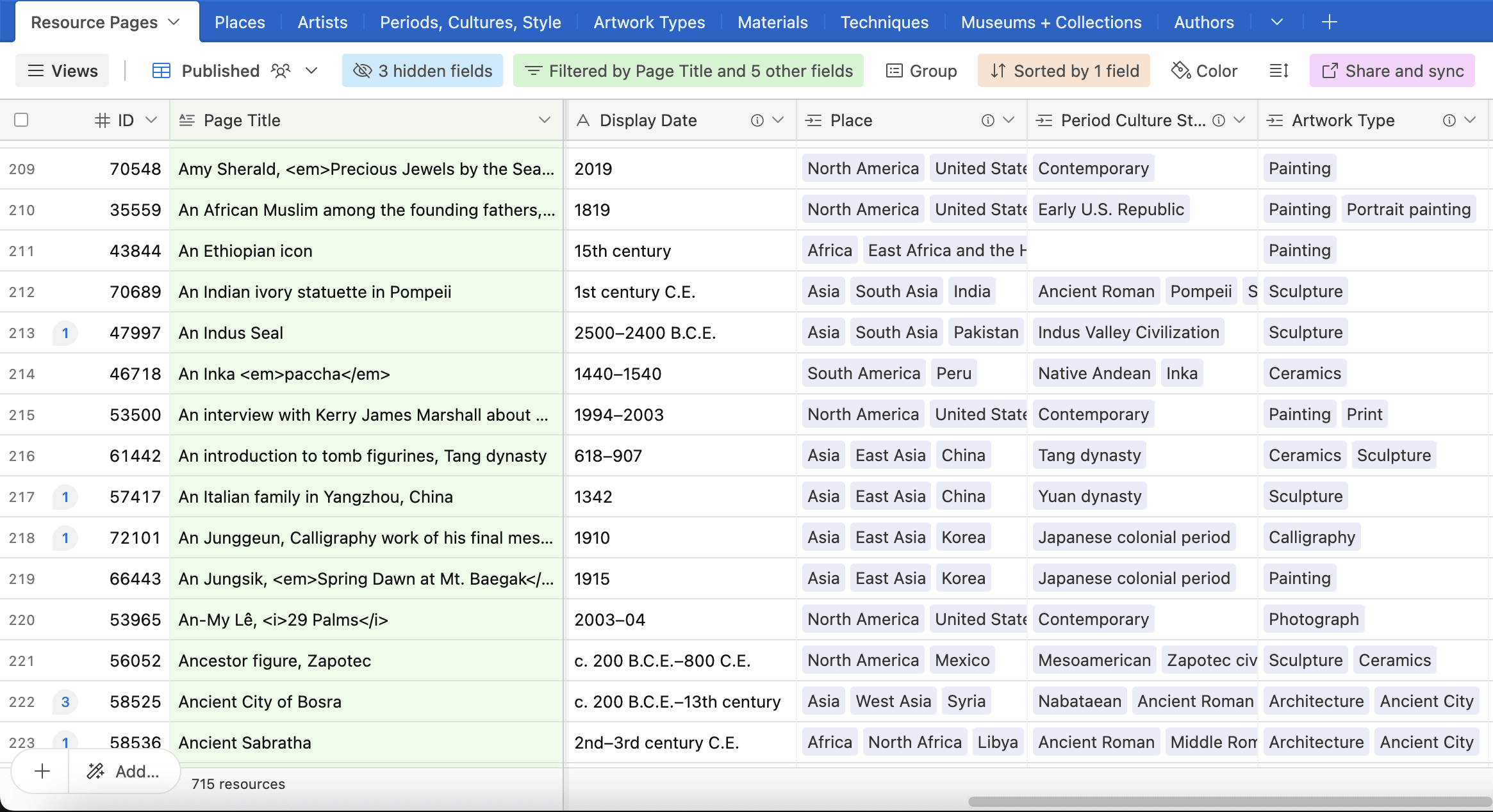
Table in Airtable base with content pages and metadata
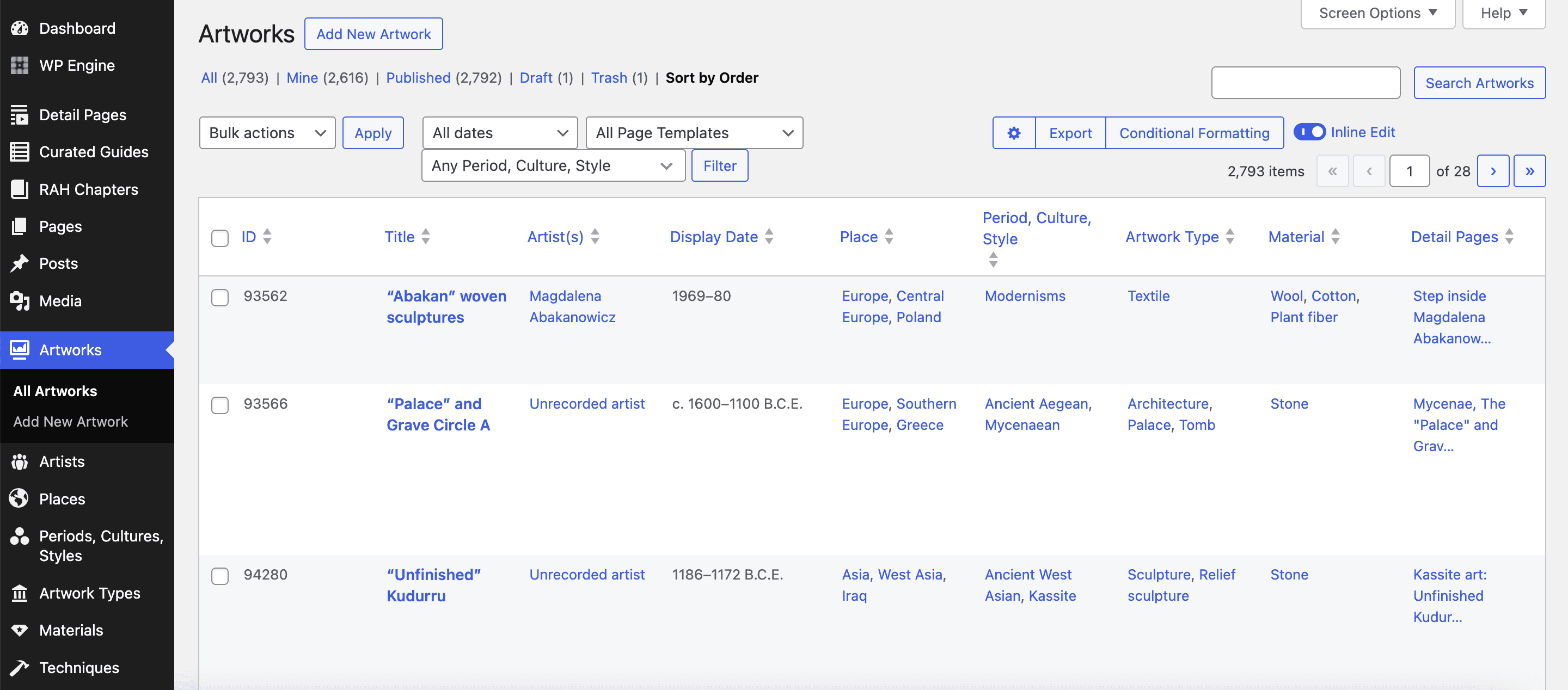

WordPress Configuration and Data Import

  • Built out custom post types and advanced custom fields with ACF

  • Imported metadata + taxonomies from Airtable to WordPress

  • Cleaned data as needed

  • Worked with developer to create an admin interface that allowed for easy data entry and editing in WordPress


  1. Discovery

  2. Define

  3. Ideate

  4. Prototype & Test

  5. Design

  6. Implement

Admin interface of WordPress showing artwork metadata. Many custom fields have bidirectional relationships, so that updates will be automatic on both ends.


Metadata Governance and Staff Onboarding

  • Collaborated with team to create documentation and a guide to metadata governance

  • Trained staff via workshops and tutorials


  1. Discovery

  2. Define

  3. Ideate

  4. Prototype & Test

  5. Design

  6. Implement

PHASE 1: UI/UX Updates

UI styling, including text styles, grid alignment, and colors, were streamlined and modernized. Egregious UX pain points from initial usability testing of legacy site were triaged and resolved.

  1. Discovery

  2. Define

  3. Ideate

  4. Prototype & Test

  5. Design

  6. Implement

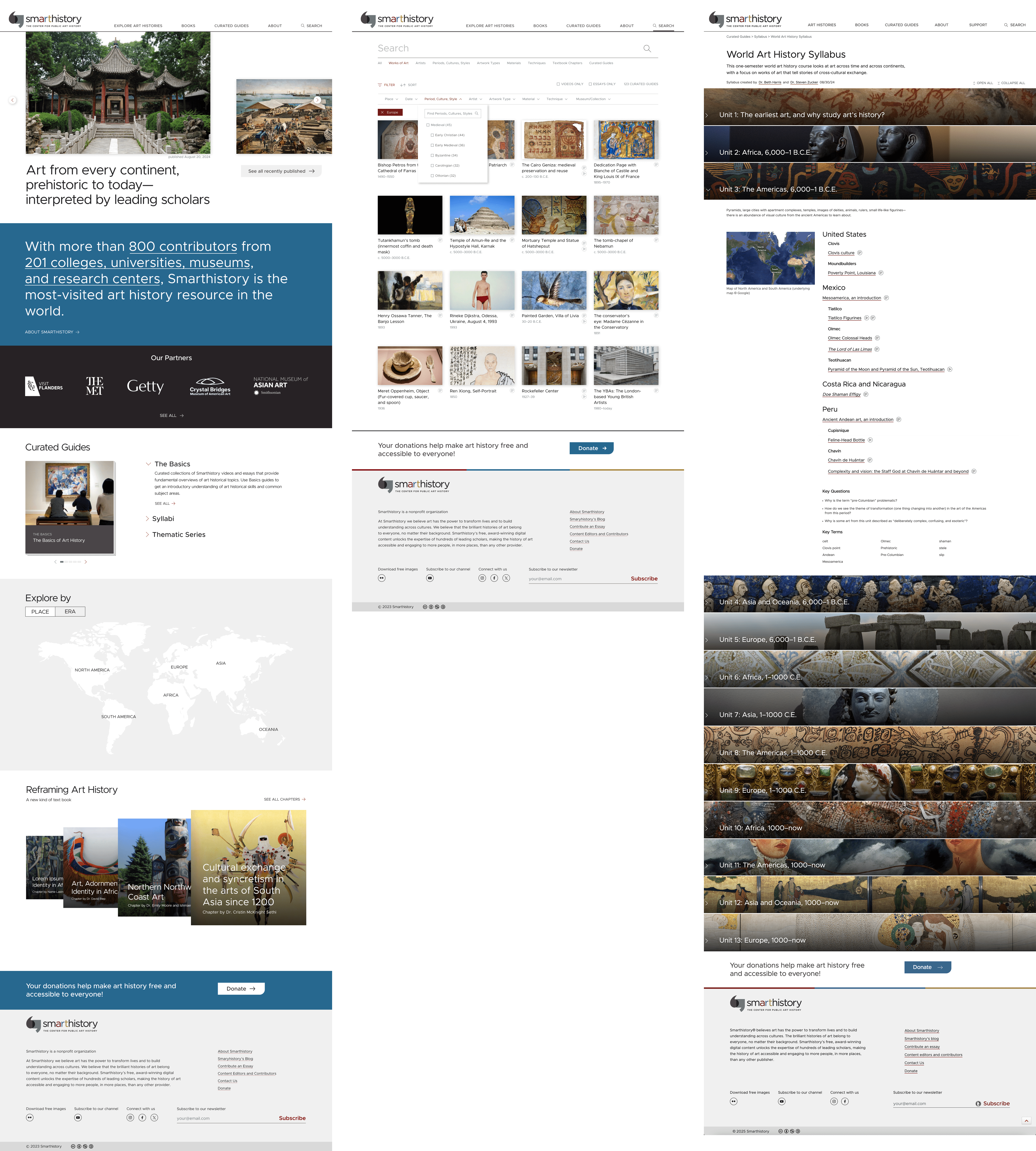
PHASE 2: Curated Guides

Clear, new categories of Curated Guides, as well as new syllabi, were launched.

Recruited scholarly contributors to produce priority syllabi.

Staged and published syllabi using new Curated Guides template design.

QA'ed development of new page template design.

  1. Discovery

  2. Define

  3. Ideate

  4. Prototype & Test

  5. Design

  6. Implement

PHASE 3: Landing Pages, Search Results Page, Homepage

Landing pages launched as "hubs" of content for exploration and nonlinear discovery.

Search results features filtering and sorting for content about works of art.

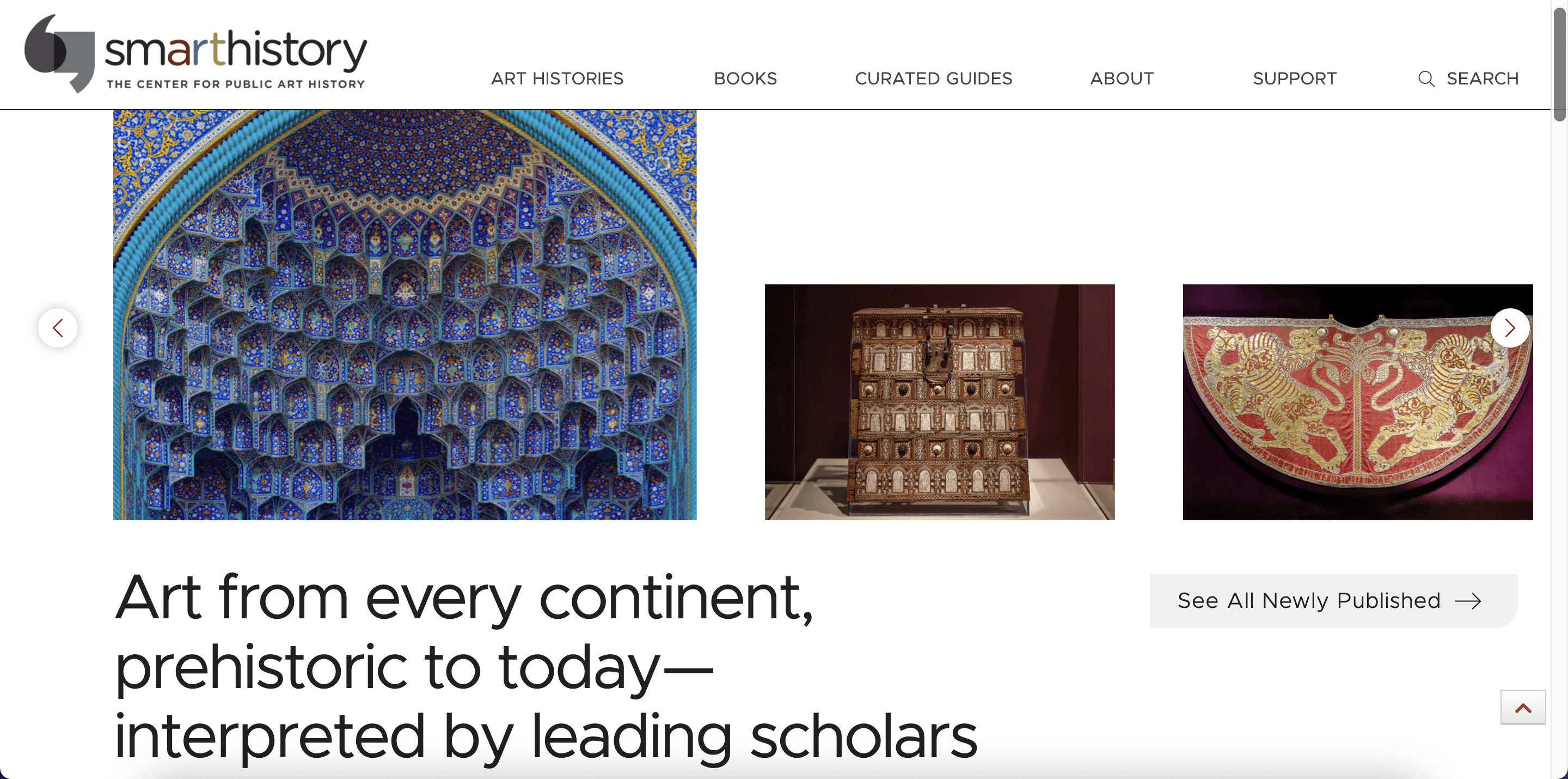
Homepage represents new era of Smarthistory.

  1. Discovery

  2. Define

  3. Ideate

  4. Prototype & Test

  5. Design

  6. Implement

View Live Site

Solution

Solution


Solution


Impact

From 40% of benchmark tree test participants failing common navigation tasks


to

87.7% of AP and college instructors rated overall experience excellent or good

90% rated experience of moving around the site as very easy or easy

87% rated finding what they were looking for as very easy or easy


Staff have also shared feedback on the ease and intuitiveness of the admin interface now that fields and posts are consolidated and organized.

From 40% of benchmark tree test participants failing common navigation tasks


to

87.7% of AP and college instructors rated overall experience excellent or good


90% rated experience of moving around the site as very easy or easy


87% rated finding what they were looking for as very easy or easy


Staff have also shared feedback on the ease and intuitiveness of the admin interface now that fields and posts are consolidated and organized.

What I learned

💡 When a big transition is underway, trust eases uncertainty.
“Move at the speed of trust” is something I hear again and again from folks who facilitate change; I’m grateful that this project went smoothly in part because of the trust that our team has developed over years of collaborating, and the trust that many of Smarthistory’s users have in our ability to meet their needs.

💡 Listen for what’s working, as well as opportunities for change.
It would have been a mistake to overlook what users said worked well and made changes that threw the baby out with the bathwater. What makes this project successful is its synthesis of the essential functions that make Smarthistory what it is and new enhancements that allow the very structure of the site to reflect changes in the field.

💡 Meet people where they are, even if different people are in different places.

This goes for both end users and for internal team members. Navigating change, whether it’s a new workflow, website, or way of teaching, means understanding where different people might be on a spectrum of readiness for change, meeting their present needs, and equipping them to evolve in time.

💡 Using metaphor and visuals can be crucial in helping bridge understanding.

This project crossed many different expertises: art history expertise, engineering expertise, taxonomic expertise, information architecture and design expertise. Using metaphors and visual representations created a common ground for understanding a vision of change that lived as an idea long before it became a reality.

💡 Design isn’t over after implementation begins.
Sometimes a designer’s role concludes after creating mockups or sharing proposals. Seeing this project through implementation reiterated that processes of implementation are another kind of experience to design with people in mind.

What I'd do differently now that I know what I know

  • Bring in developers much earlier to be a part of the conversation around how design ideas and strategies would be informed by technical constraints and foreseeable challenges. This would have enabled us to possibly avoid some delays because of the technical complications of some the features.


  • Do more thorough feature prioritization at the top. This would have helped lighten the load from the get-go, instead of having to deprioritize features that we were non-essential when dev time got tight.


  • Do fewer rounds of staff feedback on wireframes, and test high fidelity prototypes sooner to get faster turnaround on insights to iterate designs.


  • If there was time, incorporate open card sorting during user research to validate some of the labels.

© 2025 Kayla’s Portfolio. All Rights Reserved.

Create a free website with Framer, the website builder loved by startups, designers and agencies.